
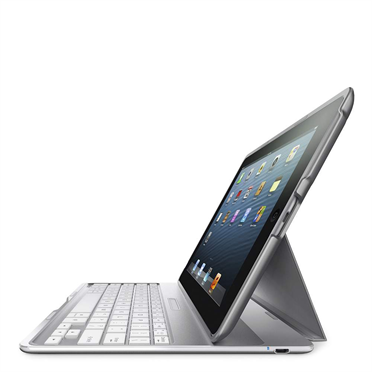
 A little over a year ago I wrote about my new Belkin keyboard case for my iPad and have used it more than a little over that time. However it did have one shortcoming – I could not use it on my lap. Well, Belkin to the rescue. My new Belkin keyboard case sits comfortably on my lap – I am using it to compose this post while sitting in reclining chair. Belkin did not stop with that one change. The new keyboard case is lighter, thinner and has superior battery life – 1,900 hours usage and 4,300 standby hours. There are also some convenience feature not found on the earlier version. Opening the keyboard case turns the iPad on and closing turns it off. The keyboard is “smart” and activates when needed and does not have an on/off switch. The keyboard base is constructed of an airplane grade aluminum alloy providing a solid base. The keyboard itself is marginally smaller than the earlier version but even with my less than dainty fingers touch typing is no problem. When using the iPad for reading or other activity that does not require a keyboard the keyboard portion folds away nicely. Particularly if you sometimes use your iPad as a notebook computer replacement a keyboard is, in my mind, a necessity and find a keyboard case a better solution than a separate keyboard.
I purchased mine directly from Belkin but it is also available from a number of retailers. You can purchase the keyboard case or find a retailer list on the Belkin website at http://www.belkin.com/us/F5L149-Belkin/p/P-F5L149. An interesting change since I purchased mine – at that time the Black model was $99.99 and the Silver model at $129.99. Now both are $129.99. Belkin also offers free ground shipping and at least in my case no sales tax. There are other keyboard cases that allow typing on your lap from Zagg, Logitech and Adonit’s but the Belkin is the only one that offers three different screen angles.
We all know how handy those pockets in our jeans are and how much we would miss them. Well, now there is a Pocket for your computer. Pocket is an add-in for Google Chrome, Safari and Internet Explorer and is just as handy as those pockets in your jeans. Some of you may have encountered Pocket under it’s previous name – Read It Later. How many times have you found a web page that you would like to read later or one that has some detailed information that you would like to retain. With Pocket installed all one has to do is click the Pocket icon in the upper bar and “presto” the page is saved to your Pocket account and it will stay there until you throw it away. Pocket also allows one to select articles from some 300 different applications and services. Some are Flipboard, Twitter and Pulse. I am using Pocket on my MacBook Air, iMac, iPad and iPhone as as all use the same database anything saved to Pocket is available on any device. Highly recommended!
 Loren Berg's Blog