
I had been living with the iPad 3 having bypassed the iPad 4 and the iPad Air. While my iPad 3 was working fine, I really wanted to upgrade to the iPad Air 2. If one is willing to use a little ingenuity and maybe strech a little sometimes the right opportunity presents itself. We spent Thanksgiving in Boise Idaho with our daughter and son-in-law and noticed that our daughter’s iPad had a broken display. Well, being a nice father I offered my current iPad to her and wallah I needed a new one.
Off to the Apple store and what do you know I left with a new iPad Air 2. Except for a little kerfuffle with Verizon – nothing new there – rather than just assign my new iPad to my existing number as I requested they assigned a new number to the iPad Air 2 and of course charged me a setup fee. A little over an hour on the phone the next day and things were resolved but an unnecessary waste of time.
I suspect if I had acquired the first iPad Air the difference would not be that noticable but coming from the iPad 3 to the iPad Air 2 the difference is nothing short of amazing. So much lighter and thinner that it is hard to belive that the new one is both faster and has better battery life. Other little touches like the fingerprint login and included iWorks help. All I can say is that if you did not get the first iPad Air do yourself a favor and take a look at the iPad Air 2.
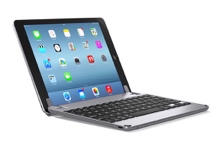
Well lighter and thinner is great but that meant that my keyboard case for the iPad 3 was not going to work. I first ordered a Belkin Keyboard Case for the iPad Air 2 similar to the one I had for the iPad 3 but returned it because the keyboard backlighting did not work. In the interim I saw a glowing review from Joanna Stern of the Wall Street Journal on the Brydge keyboard for the iPad Air. (They have models for most of the iPad models.) While it is a little pricer – $160.00 vs. $149.00 for the Beklin – I ordered one. The current model is for the first iPad Air which is a little thicker than the iPad Air 2 but Brydge supplies replacements for the shims that hold the iPad Air 2 securly. Bear in mind, the Brydge is not a keyboard case it is a keyboard that has two extended hinges that hold the iPad (see the image above) so the back of the iPad is not covered. That, and probably the price, are the only issues with the product. The keyboard itself is without a doubt the best one for an iPad I have seen. It is not quite as large as the keyboard on my MacBook Air but touch typing is a breeze. Key spacing is good and the feel is that of a real keyboard. Couple that with three levels of keyboard backlighting and a range of 135 degrees in dislay placement plus no issues with the iPad slipping or flopping around when typing on your lap and this is a winner.
I am writing this post on the iPad Air 2/Brydge Keyboard combination using an app called Blog Pad Pro on my lap while watching a football game. First time with the app but it appears to be more capable than the free WordPress offering. One distinct advantage is that you can schedule the publishing of the post at a later date something missing in the standard WordPress offering. More about the app after I have a little more time with it. However, this is one more step in making the iPad and keyboard my only computing device when traveling..

 Loren Berg's Blog